Malone/Tunezilla
Showing all 7 resultsSorted by latest
-
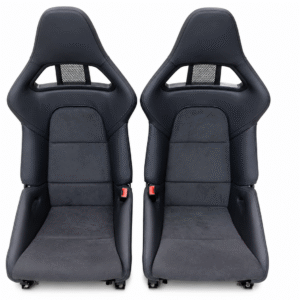
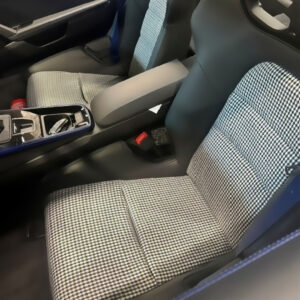
997, Interior
Covers for Porsche® 997 Folding Carbon Fiber buckets Euro 991
Custom seat inserts covers that fit the 997 Folding Carbon Fiber style seat (as shown). Will also fit European 991 and 992 GT Sold as a set for 2 seats.
Installation requires removing the factory upholstery cover from the existing foam cushion and fitting the new cover in its place. This being said, we offer just the covers. Total of 6 covers. 2 Headrest, 2 center Lumbar section and 2 bottom cushions.
We have included a Youtube video below.
SKU: 997_Centers -
992, Interior
Covers for Porsche® LWBs for 991.2 992 GT3, GT3RS, Dakar, S/T, GTS and Turbo
Custom seat insert covers that fit the 991.2 , 992.1 Porsche® GT3, GT3RS, Dakar, S/T, GTS and Turbo LWB Carbon Fiber style seat (as shown) . Sold as a set for 2 seats.Important Note – For 992.1 GT3, GT3 RS, Dakar, ST, GTS, and Turbo models, the passenger-side airbag pressure sensor differs from the earlier 991 long-wheelbase seat design. In these vehicles, the sensor is incorporated into the factory foam section located within the lower passenger seat cushion.
Installation requires removing the factory upholstery cover from the existing foam cushion and fitting the new cover in its place. This being said, we offer just the covers. Since you doing 1 seat it’s not much more time to do the other 3 pieces and this saves you lots of money from other out there.
We have included a Youtube video below.
SKU: LWB992_Centers -
Malone Tuning by TuneZilla, Porsche TDI, Volkswagen TDI
TuneZilla FlashZilla Pro | TZ-FlashZilla-Pro
The all new FlashZilla Pro tool. Allowing you to flash your vehicle from the comfort of your driver’s seat wherever you have an internet connection. This OBD flashing device connects users directly to our InstaTune catalog through our TuneZilla Portal App. Using the supplied USB cable, simply connect your device to a Windows 10 or 11 laptop and plug in to your vehicle’s OBD port.
InstaTune – Any Tune, Anytime
Flashing is made easy with our FlashZilla Tuning Portal app. The step-by-step process is easy to follow and makes quick work of your ECU or TCU tuning. FlashZilla Pro will read your ECU and TCU and automatically search our InstaTune library for all compatible tune files.
- Connect directly to InstaTune
- Purchase and Download files at home
- Request ticket support and custom tuning from the app
- Organize and edit your tune library
- Flash multiple vehicles with one tool
FlashZilla Pro connects directly to InstaTune through the TuneZilla Portal app and allows users to search for compatible tunes from our extensive tune library. If you don’t see a tune that works for your setup, you can request a custom tune right from the Tuning Portal. The FlashZilla Pro tool is not VIN locked, so you can use it to read and write multiple ECUs. You can even manage your tune library and organize the tunes you’ve downloaded, making it easy to select and flash the appropriate tune file for your desired fuel octane or driving styles, such as Low Boost and High Boost files, or 91 Octane and 93 Octane files.
Notes
- All ECU / TCUs should be returned to stock/factory software before flashing with FlashZilla Pro.
- FlashZilla Pro tool requires a Windows computer to install and operate the TuneZilla Portal App.
- At this time, only Windows 10 or 11 computers with x86-/x64-based processors are supported.
- The TuneZilla Portal App supports offline flashing for tunes that are already downloaded to your tune library.
Download The App
To download the TuneZilla Portal app and register your FlashZilla device, click here or visit portal.tunezilla.com. THIS IS THE TOOL ONLY IF YOU ARE LOOK FOR A TUNE THAT WE DO NOT HAVE PLEASE EMAIL US AND WE CAN HELP YOU. WE SPECIALIZE IN PORSCHE AND VW TUNES.
SKU: tunezilla_pro_tool